Above the Trees has moved!

You should be automatically redirected in 5 seconds. If not, visit
http://photoloom.wordpress.com
and update your bookmarks.

Showing posts with label new features. Show all posts

Serendipitree

Posted by Renee Saturday, February 6, 2010 1 comments

Photoloom has a new face! We've changed our color scheme and tweaked our logo. Now if you look closely, you can see a "tree" woven into our photo-corner ~ the perfect marriage of photos and family history!


Serendipity is my all time favorite word.

Last Thursday night, I was reviewing some updates our daughter had made to some of our graphics when Serendipity snuck up and stamped on my toe. All of a sudden, I saw “the tree,” right there in front of me. Sure, it was sideways and hidden, but it was there.


Has that always been there? Why haven’t I seen it before? Why did it taken me three and a half years to see something so obvious?


If you’ve been working on your family history for any amount of time, you’ve asked yourself these very questions. There you are, hunched over your desk, scanning the same document for the hundredth time, when suddenly something completely new jumps out at you.
Something that HAS ALWAYS BEEN THERE, just waiting for you to find it. And most of the time, this happens when you are all alone, and you want to jump around the room and hug someone and tell them about the cool thing you just discovered, but there’s no one there and so you have to just kind of squeeze yourself and smile a lot.

Or maybe that part’s just me.


Anyway, my point is, things don’t always happen like we expect them to. And sometimes that’s a good thing.


____________________
Have you entered our Family Threads Contest yet? Send us your favorite family history photo and a short description/story/memory about it! First prize is two tickets to the St. George Family History Expo at the end of this month.

Share |

Photoloom Affiliates with New FamilySearch

Posted by Renee Monday, January 11, 2010 3 comments

Big things are happening at Photoloom! Just for starters, we are now an official software affiliate with New FamilySearch, and are working to become “New FamilySearch Certified.”

With our upcoming 3.0 release, Family Photoloom members will be able to import information from New FamilySearch* and tag their pictures with New FamilySearch IDs, enabling their pictures to be associated with records stored in New FamilySearch.

What does this mean for you?

  • You can import your genealogy information into your Family Photoloom account directly from New FamilySearch, so you will no longer need to type it in.
  • You can help ornament the global New FamilySearch tree with your pictures and documents. You have complete control over what is kept private and what is made available to other researchers.
  • Together we are paving the way for a new generation of "image-enriched genealogy."

  • Call for 3.0 Beta testers: If you are a New FamilySearch user, we need your help! We are in need of Beta testers to help us polish our upcoming 3.0 release. Your efforts will take very little time and will help us immensely. All Beta testers will receive an expanded Free Family Photoloom account. Please contact us at support@photoloom.com, or call 503.628.1922 for more information.

    * FamilySearch is a family history website provided by The Church of Jesus Christ of Latter-day Saints. It provides its resources free of charge to the public and is one of the most heavily used genealogy sites on the Internet. A new website, now known as New FamilySearch, that gives users the ability to edit data was launched in 2007, and is incrementally becoming available to genealogists worldwide. For more information, click here.

    HASNBT6Z4U2Q (Ignore -test)

    Share |

    Noting Photo History

    Posted by Renee Tuesday, August 4, 2009 0 comments


    Below is a screen shot from my personal Family Photoloom account. The picture in the main frame was taken on my Dad’s 80th birthday. We had just thrown him a surprise party – complete with balloons and cake and old friends – and, almost as an afterthought as we were packing up after the party, we asked my daughter’s friend Sara to snap a quick family picture. We even noted at the time that it was the only picture we’d ever taken of the whole family that included all five of my daughters. It turned out that it was also the last picture ever of taken of Dad – he died six weeks later.
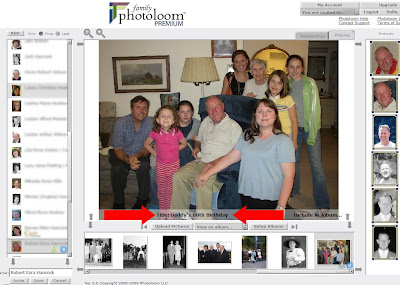
    The particulars surrounding the history of this picture make it all the more meaningful me, and I don’t want those details to fade with time. I want to be able to record them and associate them to this specific picture.

    I usually find a way of getting what I want.

    In this case, I know the developers of Family Photoloom pretty well, so when I asked last week if I could plan on posting my next blog about a "Notes" feature that didn't exist at the time, I was relatively confident that it would be up and running by the time I was ready to hit "publish post." They didn't let me down.

    Our newly added Picture Notes couldn’t be easier to use: just pop open the Title Pane (indicated by the red arrows above) and type or paste up to 1024 characters (roughly a 170 words) into the window labeled “Picture Notes."
    While we're on the subject, let's look at a few other notable features of the Title Pane.

    The fields that are initially revealed when you click on the Title Pane are for recording specific data about the picture, and can all be edited. This includes Title, Location, Date, Source, and now, Picture Notes.

    But wait! Click "More" and a second tier of fields appears below the Title Pane. These additional fields are automatically populated by Family Photoloom, and include revision information and unique image identification numbers.

    Let's examine that last one. Note the green arrow in the image above pointing to the Picture URL. (No, not Oliver Queen.) Every picture uploaded to Family Photoloom is assigned a unique URL. This file name is encrypted, which allows you to do a couple of significant things:

    • Send a picture to someone without giving them access to your Family Photoloom account.
    • Blog - safely and confidently - using pictures from your Family Photoloom account, without the threat of someone hacking into your other pictures. Example: If one of your blog photos has a URL that has a Family_Vacation_23.jpg in the URL, it stands to reason that if I l change the 23 to a 22, I’m likely to find more of your pictures – maybe even ones you don’t want me to see.
    Family Photoloom avoids this scenario entirely.

    To wrap things up, let’s go back to the beginning. Last week, I asked you to find a picture of someone in your family - old or new, alive or long departed - and write down six sentences about him or her. That's it. One picture, six sentences. Did you do it? Yes! That's great!! Now, you are ready for this week's...(insert kettle drum-roll here)...

    Family History Challenge O’ the Week: You guessed it! Go onto your Family Photoloom account and add those six sentences to a picture of that relative. How easy is that?


    Register online for the Salt Lake Family History Expo today!

    Remember to add me on Twitter - @Photoloom

    Share |

    One-Click Downloads

    Posted by Renee Monday, May 11, 2009 0 comments

    When Cheryl called us recently to suggest a new feature for Family Photoloom, she probably wasn’t expecting to see it up and working in less than 24 hours. But it was!

    Cheryl asked for a feature that would allow her to save a portrait she created in her Family Photoloom account to her hard drive, so that it could be used as the “key” picture for that individual in other genealogy applications. The result is our new One-Click Download feature.

    Portrait Downloads: Each time you tag a face or anything else with Family Photoloom, a portrait is created. When you choose a record from your “Records” list, all the portraits of that individual appear in a “Portraits List” on the right of your screen.

    To download a portrait for use in other applications, simply click the new ‘download’ button that appears on a portrait in the “Portraits List” when the mouse cursor is over it. You will then be prompted to save image to your computer’s hard drive.

    Picture Downloads: One-Click Downloads have also been added to the group picture thumbnails at the bottom of the screen to make it easy to download a “full picture.”

    Thank you, Cheryl!

    One last n
    ote: When you contact us at Photoloom, know that we set the bar on Member Support high. We want to hear from you. Tell us what you like, what needs improvement, and what you’d like to see in the future. Who knows, you might even be the next “Cheryl,” and your new feature could be up and running by tomorrow.

    Share |

    You're Invited!

    Posted by Scott Monday, April 6, 2009 0 comments

    "Photoloom gives the non-genealogists in our family something that they can understand; that will evoke memories...it’s something that draws them in. (Family Photoloom) is showing the connections between the faces in those pictures." ~Lisa Cook, Genealogy GEMS

    Sharing family history with family and friends has always been one of our main goals, we've added a new feature that makes sharing even easier. Our new "Invite Button" allows you to invite others to view, browse (and even edit if you choose) your Family Photoloom account. Simply select someone from your “records” list on the left side of your Family Photoloom account screen, and then click the “invite” button at the bottom. Enter the individual’s email address and click “send.” You will see a preview of your invitation before it is sent, and can even customize it if you wish.

    I took the opportunity to sit down with Lisa Louise Cook at the Family History Expo in St. George, Utah to tell her about this new feature and other recent innovations at Family Photoloom.


    Visit Genealogy Gems to listen to more podcasts from Lisa Louise.

    Share |

    We've Made the Leap!

    Posted by Scott Thursday, November 20, 2008 0 comments

    Communicating with our site users and members is at the top of our priority list, and we’ve made great efforts to keep the lines of exchange flowing since we started Photoloom two years ago. For the last year, we’ve published a traditional 4-page newsletter both online and on paper, and, overall, that's worked pretty well for us up until now.

    (Except for the time when someone decided to mark our email as SPAM, which - long story short - resulted in our former Internet provider not only shutting down our server, but blocking our access to it as well. Well, we live and learn. Needless to say, we now have a new Internet provider and a dedicated server of our own.
    )

    However, with the recent launch of Family Photoloom web-service to the public, we find ourselves entering a new phase, and our perspective on the best ways to communicate continues to evolve.

    As you might expect, we attend a number of Family History conferences, and we have the opportunity to talk with a wide array of people in the Family History community . We are excited to see that a vast majority of family historians continue to embrace Internet technology with open arms, and, notably, blogging is becoming an increasingly popular and practical mode of communication for both family historians and the companies designed to serve them. We fall into both categories, so blogging seems a natural step forward for us.


    With this new insight, our first thought was to simply discontinue our newsletter and rely exclusively on blogging to communicate news and information to our site users. Renee, however, being our in-house advocate for the technically shy (my words, not hers) convinced me that some of you, particularly those who still enjoy a good book made of real paper (her words, not mine), might not immediately make the leap into a blog RSS feed with us.

    Well, we don’t want to lose you in that chasm between newsletter and blog, so we’ve come up with a hybrid solution! We will continue to offer a variety of instructional, informative, and enlightening articles to you, but each piece will now be published ‘blog style’ - one topic at a time. This means you won’t have to wait a whole month to read about new resources for family historians or receive information on new Family Photoloom features.

    You can have articles sent to you in one of two ways (or you can choose both if you want!):

    1. Subscribe to our RSS feed: To do this you will need an RSS Reader (called a “feed reader” or “aggregator”). Once you have an aggregator, simply click on the link we have provided.

    2. Subscribe to our monthly digest: (No aggregator needed) This is a monthly digest of our blog content: with this option we will email you a quick summary of our content once a month.

    * For more information about, or a list of, RSS feed aggregators, visit http://en.wikipedia.org/wiki/Aggregator.

    Speaking of receiving email from us, please take a moment right now to set up your email filter to accept email from News@photoloom.com. And PLEASE, PLEASE do not mark our email as spam. You will always have the option, right in the email, to be removed from our distribution list.

    If you are new to blogging, learn more here http://en.wikipedia.org/wiki/Blogging.

    Our Pre-Blog Newsletter content can be found at Photoloom Newsletter Archive.

    Share |